KDV COURSE

Editing and YouTube from scratch

Kaah teaches editing. Daniel teaches strategy, SEO and growth. By the end you can do the work: grow your own channel or get hired.

  • 40lessons
  • ~10hours
  • 30M+views edited
  • R$ 400kon the aaabw channel

FOR BEGINNERS AND PROS

KDV is for you

Never edited before?

You start from zero: from your first look at Premiere to exporting a finished video, all inside a real project.

Already editing?

Speed up with Kaah's shortcuts and workflow, and learn the YouTube strategy that gets a video watched.

Editing

  • Premiere from zero to a professional workflow
  • Rough cuts, pacing, voice and sound design
  • Motion, text, overlays and vertical format
  • Quality control and export

YouTube

  • Video ideas with search potential
  • Titles and thumbnails that get clicks
  • SEO: keywords, descriptions and chapters
  • Retention and analytics in practice

Career

  • Grow your own channel
  • Or use what you learned to get hired
  • Revisions and a professional workflow
  • Monetization and your channel as a showcase
See the plans

MODULES

What's inside KDV

    1. 1.First contact, workspace and project
    2. 2.Importing, organization and sequence
    3. 3.Keyboard shortcuts and editing speed
    1. 1.How to come up with video ideas with real search and engagement potential
    2. 2.How YouTube decides who sees your video (search, suggested, home feed)
    3. 3.How to validate an idea before filming
    4. 4.Content pillars and planning your next videos
    1. 1.Performance, autosave and offline media
    2. 2.Timeline, tracks and cuts
    3. 3.Briefing and full rough cut
    1. 1.Titles that make people click
    2. 2.Thumbnails — readability, contrast and curiosity
    3. 3.How to test and swap title and thumbnail without breaking the video
    1. 1.Voice and dialogue
    2. 2.Music, silence and sound design
    1. 1.How to hook attention in the first seconds
    2. 2.Retention: what holds and what loses your audience
    1. 1.Motion, keyframes and anchor point
    2. 2.Zooms with intention
    1. 1.Spoken keywords, captions and transcripts
    2. 2.Descriptions, tags and hashtags
    3. 3.Chapters and timestamps
    4. 4.Publishing: timing, premieres and the first hours
    1. 1.Text, captions and graphics
    2. 2.Memes, overlays, effects and composition
    3. 3.Deconstructing a finished edit
    1. 1.Building a channel with identity and authority
    2. 2.Playlists, cards and end screens
    3. 3.Shorts, live streams and other formats
    4. 4.Comments, community and returning viewers
    1. 1.Horizontal and vertical
    2. 2.Revisions and professional process
    3. 3.Quality control and export
    1. 1.Analytics in practice
    2. 2.The video didn't perform: how to diagnose it
    3. 3.How to bring old videos back to life
    1. 1.Production routine and content calendar
    2. 2.Monetization and the channel as a showcase
    1. 1.Wrap-up with Daniel: YouTube
    2. 2.Wrap-up with Kaah: editing

WHO TEACHES

We teach what we do

Kaah's profile picture

Kaah

@kaahtls

  • Editing videos since 2021
  • Averages R$ 10,000/month from editing alone
  • Over 30 million views on videos she edited
  • Averages 10 recurring clients a month
Daniel's profile picture

Daniel

@aaabw

  • Editing videos since 2014
  • R$ 45,000/month from editing and YouTube management
  • Scaled 8-figure direct-to-consumer (DTC) operations
  • Works for international clients
I want to learn from them

REAL RESULTS

The aaabw channel's numbers

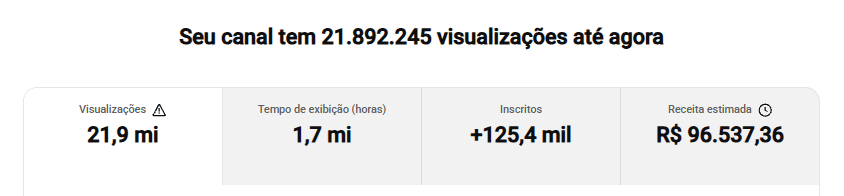
aaabw channel analytics in YouTube Studio: 21.9M views, 1.7M watch hours, +125.4K subscribers and R$ 96,537.36 estimated revenue
The estimated revenue above is AdSense only. Adding sponsorships and other income, the channel has earned R$ 400k.

PRICING

Choose how to join KDV

KDV

The full course: editing with Kaah and YouTube with Daniel.

12x R$ 33or R$ 397 in one payment
most chosen

KDV + Pack

The full course plus the Professional Editing Pack to use from the first lesson.

+ Pack for just R$ 2,90/month

12x R$ 35,90or R$ 427,90 in one payment

7-day guarantee: if it's not for you, we refund your money.

Just want the Pack?

QUESTIONS

Frequently asked questions

Yes. You start from scratch: from your first look at Premiere to exporting a finished video, all inside a real project. And if you already edit, you'll speed up with Kaah's shortcuts and workflow.

The editing lessons use Adobe Premiere Pro, so you need a computer that runs Premiere. The Adobe subscription is separate, but our team helps you through getting it. There's a whole lesson on performance, saving and offline media to get the most out of your machine.

As soon as your payment is confirmed, you get an email with access to the Cakto members area, where all 40 lessons live. Access is lifetime: watch at your own pace and rewatch the lessons whenever you want.

You have 7 days from purchase to watch the lessons. If you decide KDV isn't for you, just ask for a refund within that window and we return 100% of your money, no questions asked.

Yes. You can split it into installments on a credit card or pay in one go, right in Hubla's secure checkout. Each plan's price is shown just above.

Still unsure? Talk to us on WhatsApp

7-day unconditional guarantee

Join KDV and watch the lessons. If within 7 days you decide it's not for you, we refund 100% of your money, no questions asked.

Save my spot12x R$ 33